
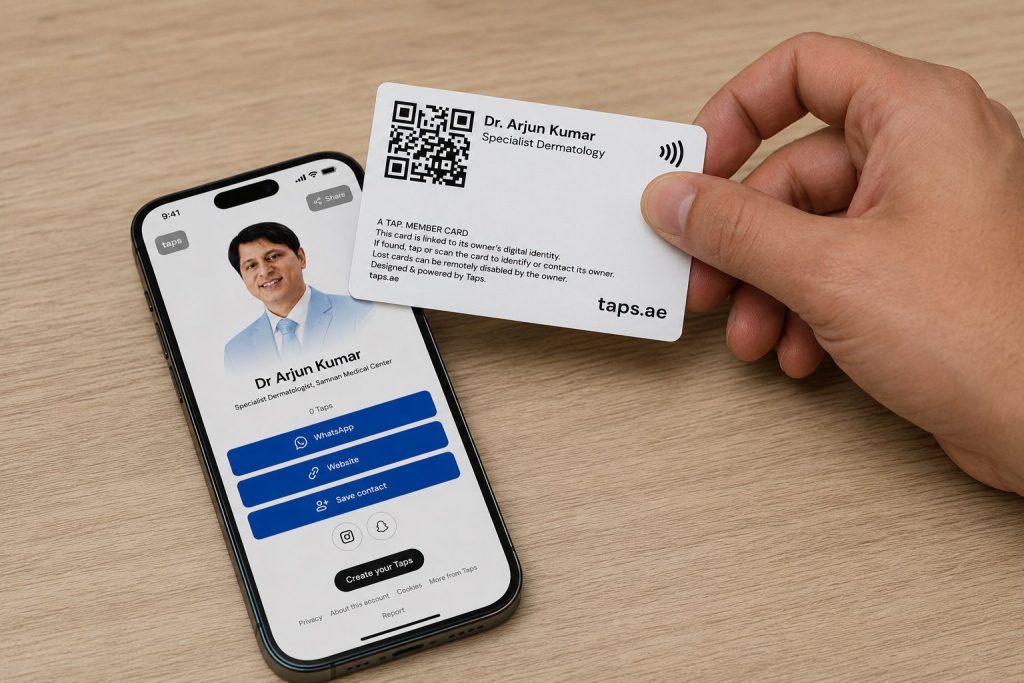
Professional communication has changed.
A few years ago, exchanging contact information usually meant handing someone a printed business card or manually typing a phone number into their device.
Today, people expect something faster.
A patient may want your clinic’s WhatsApp.
A professional contact may want your LinkedIn profile.
Someone attending an event may want your phone number, email address, website and location.
Sharing each detail separately takes unnecessary time.
Modern digital profiles make it possible to bring these details together and share them through a single link, QR code or NFC-enabled card.
One interaction can give someone access to everything they need.
What Does “One Tap” Actually Mean?
The concept is straightforward.
Instead of giving someone multiple pieces of information individually, you create one digital profile containing the details you want to share.
For example, your profile could include:
- Name
- Professional title
- Organization
- Phone number
- Website
- Location
- Other useful links
The profile can then be shared through:
- NFC
- QR code
- Direct web link
The person opens the profile and chooses how they want to connect with you.
Why Is This Better Than Sharing Details Manually?
Consider a normal conversation.
Someone asks:
“Can I have your WhatsApp?”
You give them your number.
Then they ask:
“Do you have LinkedIn?”
You search for your profile.
Then:
“Can you send me your website?”
Another link has to be shared.
A digital profile changes the process.
You share one destination.
From there, the person can choose:
Call
Website
Save Contact
This reduces unnecessary steps.
1. Share WhatsApp With One Tap
WhatsApp is an important communication channel for many UAE businesses and professionals.
Instead of asking someone to manually save your number before messaging you, a digital profile can contain a direct WhatsApp action.
The process becomes:
Open profile → Tap WhatsApp → Start conversation
This can be particularly useful for organizations where customers frequently communicate through WhatsApp.
For example, Samnan Medical Center already provides WhatsApp-based booking and reception contact options through its website, alongside its Sharjah contact details.
The same principle can be extended to professional digital profiles.
2. Share Your LinkedIn Profile Instantly
LinkedIn is especially useful for professionals such as:
- Doctors
- Consultants
- Business owners
- Managers
- Sales professionals
- Entrepreneurs
- Recruiters
The traditional method usually involves telling someone your name and asking them to search LinkedIn.
That can create problems.
There may be multiple people with the same name.
The person may forget.
Or they may never send the connection request.
A digital profile can include a direct LinkedIn button.
The person opens your profile, taps LinkedIn and reaches the correct account immediately.
3. Let People Save Your Contact
One of the biggest weaknesses of traditional business cards is what happens after someone receives one.
The recipient still has to manually enter:
- Name
- Number
- Company
Many people never do it.
A smart digital profile can provide a Save Contact action that makes the process easier.
Instead of simply giving someone information, you make it easier for them to store that information in their phone.
That is a significant difference.
Why Saving the Contact Matters
The purpose of exchanging information is not simply to say:
“Here is my number.”
The goal is to remain reachable after the interaction.
Printed business cards can easily end up in:
- Wallets
- Cars
- Drawers
- Bags
- Office desks
A contact stored directly in a phone is considerably easier to retrieve later.
4. Share Your Website
A digital profile can also contain a direct link to your website.
For healthcare organizations, that could give people quick access to:
- Clinic information
- Doctors
- Treatments
- Location
- Booking information
- Working hours
For example, Samnan Medical Center’s website currently presents its dermatology, dental, laser and Hijama services, doctor information, booking options and Sharjah contact details.
Instead of separately sending different pages, a digital profile can provide one clear website button.
5. Share Your Location
Location is another common piece of information people repeatedly send.
A clinic, office, shop or professional can include a location action within the same digital profile.
The user can then open the location directly instead of manually searching for the business.
This can be particularly useful for:
- Medical clinics
- Dental clinics
- Salons
- Offices
- Restaurants
- Retail stores
- Consultants with physical offices
NFC: The “Tap” Behind One-Tap Sharing
NFC stands for Near Field Communication.
It allows compatible devices to detect information when they are brought close together.
An NFC-enabled business card can contain a link to your digital profile.
When someone brings a compatible smartphone close to the NFC card, the phone can detect the link and allow the digital profile to open.
The basic journey is:
Tap NFC card
↓
Open digital profile
↓
Choose:
- Save Contact
- Website
- Call
This turns a physical card into an entry point to a much larger digital identity.
Do You Need an NFC Card?
Not necessarily.
A digital profile can also be shared using a QR code or direct link.
That gives you three practical sharing methods.
NFC
Useful when meeting someone physically.
QR Code
Useful on printed materials and displays.
Direct Link
Useful through WhatsApp, email, SMS or social media.
All of them can lead to the same profile.
QR Codes Can Be Used Almost Anywhere
A QR code connected to your professional profile can be placed on:
- Business cards
- Clinic reception desks
- Event badges
- Exhibition stands
- Brochures
- Posters
- Email signatures
- Presentations
- Marketing materials
A person scans the code and opens the profile.
No manual typing is required.
How Healthcare Professionals Could Use a Digital Profile
Healthcare professionals often have multiple pieces of professional information.
For example:
- Name
- Specialty
- Clinic
- Professional profile
- Clinic phone
- Clinic WhatsApp
- Clinic website
- Location
A digital profile can organize these details into one convenient destination.
This can be useful during:
- Medical conferences
- Professional networking
- Industry events
- Corporate meetings
- Healthcare exhibitions
The profile should still respect the organization’s privacy, communication and professional policies.
Digital Profiles for Doctors
A doctor’s professional profile could contain:
- Doctor’s name
- Specialty
- Clinic
- Professional biography
- Clinic contact number
- Booking link
- Clinic website
- Professional LinkedIn
The profile does not need to expose personal contact information.
Only approved professional details need to be displayed.
Digital Profiles for Clinic Management
Clinic administrators and management teams may also use digital profiles when:
- Meeting suppliers
- Attending healthcare exhibitions
- Networking
- Meeting corporate partners
- Communicating with insurance representatives
- Attending business events
Instead of carrying multiple cards or sending information individually, one professional profile can contain the relevant details.
Digital Profiles for Business Professionals
The same concept extends well beyond healthcare.
It can be useful for:
- Real estate agents
- Consultants
- Lawyers
- Sales professionals
- Entrepreneurs
- Freelancers
- Recruiters
- Creators
- Business owners
Anyone who regularly exchanges professional contact information can benefit from reducing the number of steps required.
One Profile, Different Actions
This is one of the main advantages of a digital profile.
Not everyone wants to contact you in the same way.
One person may prefer:
Another may want:
Another may want to:
Save Contact
Someone else may only want:
Website
A single digital profile gives each person a choice.
Traditional Business Card vs One-Tap Digital Profile
| Feature | Traditional Card | Digital Profile |
|---|---|---|
| Name | Yes | Yes |
| Phone | Yes | Yes |
| Yes | Yes | |
| WhatsApp action | No | Yes |
| Limited | Yes | |
| Website | Yes | Yes |
| Save Contact | Manual | Easier |
| Location link | Limited | Yes |
| NFC | No | Possible |
| QR | Optional | Yes |
| Editable information | No | Yes |
| Multiple links | Limited | Yes |
A traditional business card remains useful.
A digital profile simply adds functionality behind the interaction.
What Happens If Your Information Changes?
This is another advantage of digital profiles.
Imagine that your:
- Job title changes
- Phone number changes
- Company changes
- Website changes
- LinkedIn changes
With printed cards, outdated information may require reprinting.
With a digital profile, the information can usually be updated online while the same profile link continues to work.
That makes the system more flexible.
Does the Other Person Need an App?
A well-designed digital profile can work through a normal web browser.
That is important.
If every person you meet first has to:
- Download an app
- Create an account
- Log in
- Find your profile
the system creates more friction than it removes.
The ideal experience is simple:
Tap → Open → Connect
Privacy Still Matters
A digital profile does not mean every piece of information needs to be public.
Professionals should choose carefully what they share.
For example, a doctor could share:
- Clinic contact
- Professional profile
- Clinic website
while keeping a personal phone number private.
Businesses should separate professional and personal contact information where appropriate.
When Is One-Tap Sharing Most Useful?
It can be particularly useful during:
Networking Events
Share your professional information quickly.
Conferences
Connect with other professionals without manually exchanging multiple details.
Exhibitions
Use NFC or QR codes repeatedly instead of distributing large numbers of cards.
Business Meetings
Give clients or partners access to the correct professional information.
Professional Introductions
Make LinkedIn, contact saving and website access easier.
The Goal Is Fewer Steps
One-tap sharing is not valuable simply because NFC or QR codes look modern.
The real benefit is reducing friction.
Traditional experience:
Exchange card → Find card later → Type number → Save contact → Search LinkedIn → Find website
Digital experience:
Tap → Open profile → Choose action
The technology is useful because it removes unnecessary steps.
What Should a Good Digital Profile Include?
Keep it focused.
A strong professional profile may include:
- Professional photo
- Full name
- Position
- Organization
- Short description
- Phone
- Website
- Location
- Save Contact
Do not add twenty links simply because you can.
The profile should make the most important actions easy to find.
Digital Networking Is Becoming More Practical
Traditional business cards are unlikely to disappear completely.
Physical cards still provide a useful and familiar way to introduce yourself.
But digital communication increasingly happens immediately after that introduction.
That creates an opportunity to combine both.
A physical NFC card or QR code can provide the introduction.
A digital profile can provide the interaction.
Together, they create a more connected networking experience.
One Tap Can Be Enough
Professional networking does not need to involve manually sharing five different pieces of information.
One well-designed digital profile can bring your:
WhatsApp.
LinkedIn.
Contact details.
Website.
Location.
together in one place.
Then you decide how to share it:
NFC.
QR.
Link.
The technology itself is simple.
The benefit is even simpler:
Less searching. Less typing. Faster connection.
Frequently Asked Questions
What is one-tap contact sharing?
One-tap contact sharing uses a digital profile, NFC card, QR code or link to give someone quick access to professional contact information and online profiles.
Can I share WhatsApp through an NFC card?
An NFC card can direct someone to a digital profile containing a WhatsApp action.
Can I add LinkedIn to a digital business card?
Yes. LinkedIn can be included as a direct profile link.
Can someone save my contact directly?
Digital profiles can include a Save Contact action that reduces the need to type information manually.
Does NFC work on smartphones?
Many modern smartphones support NFC, although the exact interaction can vary by device and operating system.
Can doctors use digital business cards?
Yes, particularly for professional networking. However, healthcare professionals should share only appropriate professional information and follow their organization’s privacy and communication policies.
Can I use both NFC and QR?
Yes. Both can point to the same digital profile and can complement each other.
Do digital profiles replace traditional business cards?
Not necessarily. Some professionals use both, combining a physical card with a digital profile.